

I reported about the latest Facebook @mentions on Mashyep yesterday. Once I started using it some of my friends started to inquire how I do it and what good does it do. So now, I am putting it to a little more text so that things become a little clearer to those who are not used to this.
If you are a twitter user you would know what are @mentions. When you put @ before any twitter username it gets replaced by a link to the particular user’s profile. This way it helps spread your network. For example ..
“You should follow @rooturaj for some latest Social Media updates.”
Now any one who is following your updates (friends and connections) will know that this bloke, rooturaj, deals with Social Media. So if they are interested they might add me to their list too. Great isn’t it.
Now that was limited to twitter. But starting from 15th Sep Facebook has rolled out a similar feature. When you @mention your friends in your status updates those who are mentioned get a wall update about your status. That is your status update will appear on their wall. You may also link to Groups and Fan pages on Facebook using the same @ symbols.
All is good, but how to do it?
This again is pretty simple. Use the visual guide below.
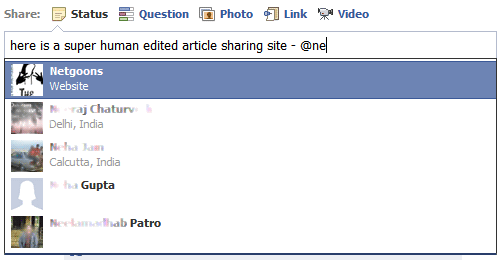
As you start typing your friend’s name facebook gives you a suggestion box to choose form. Thats not just the Friend’s name, you can even mention Pages and groups with the same trick.
Now that you know how to do it, its time to surprise some friends. Enjoy.
Update : Feb 2011
You can now mention your friends as facebook links in the comments. More awesome.
